---
title: Why does an item show as not quantified, and what do I do?
description: A red exclamation mark beside the price means an item is not quantified. What it means for your quote, what to tell us, and how a company admin fixes it.
---
[Skip to content](https://help.shedmate.com.au/knowledge/why-items-show-as-not-quantified#main-content)
English
Show submenu for translations

- [Setting up Pricing in Shedmate (course)](https://help.shedmate.com.au/knowledge/introduction-to-shedmate-costing-course)
- [Frequent Asked Questions](https://help.shedmate.com.au/knowledge/frequent-asked-questions)
- [Setting up Shedmate](https://help.shedmate.com.au/knowledge/setting-up-your-enquiry-system-for-marketing-usage-qr-codes)
- [Integrations](https://help.shedmate.com.au/knowledge/trimble-tekla-structures-integration)
Open main navigation
Close main navigation
- [Setting up Pricing in Shedmate (course)](https://help.shedmate.com.au/knowledge/introduction-to-shedmate-costing-course)
- [Frequent Asked Questions](https://help.shedmate.com.au/knowledge/frequent-asked-questions)
- [Setting up Shedmate](https://help.shedmate.com.au/knowledge/setting-up-your-enquiry-system-for-marketing-usage-qr-codes)
- [Integrations](https://help.shedmate.com.au/knowledge/trimble-tekla-structures-integration)
- English
Show submenu for translations
- Contact us
Contact us
How can we help you?
- There are no suggestions because the search field is empty.
1. [Help Center](https://help.shedmate.com.au/knowledge?hsLang=en)
2. [Quoting A Shed Project](https://help.shedmate.com.au/knowledge/quoting-a-shed-project?hsLang=en)
# Why does an item show as not quantified, and what do I do?
Short answer: **a red exclamation mark beside the price means at least one item on your drawing is not quantified.** None of your company's pricing calculations picks it up, so the total may be short. Sometimes the item is charged another way and the total is right. The quote can't tell you which, so check before you send it.
**If you quote for customers**
1. Hover over the red mark to see how many items are not quantified
2. Don't send the quote until the items have been checked
3. Click the price, then **Generate unquantified items report** to list them
4. Send the list to your company admin, or to us on ShedMate Lite
Common reasons: a size or option your company doesn't price yet, an option added after your prices were set up, or a quote started on an older version of your pricing.
### If you quote for customers
In **Instant Quoting**, the price sits at the top right. A red exclamation mark beside it (1) means something is not quantified.


In the Shed Designer, the same red mark (1) shows beside the price at the bottom right.

| | Step |
| --- | --- |
| 1 | Hover over the red exclamation mark. It shows how many items are not quantified |
| 2 | Don't send the quote until the items have been checked |
| 3 | Click the price. The pop-up shows **Total Items not Quantified:** (1) |
| 4 | Click **Show Not Quantified** (2) to see those items highlighted on the shed |
| 5 | Click **Generate unquantified items report** (3) for a list you can send |
| 6 | Ask your company admin to check the items. On ShedMate Lite, ask us |

When you generate documents, a prompt tells you the quote contains unquantified items. Depending on your company's settings, it either holds the documents back or asks if you want to continue. Don't continue unless your customer knows what is left out.
A warning triangle beside the price is a different count. It doesn't mean an item is not quantified.
**What to tell your company admin or us**
- The job name or number.
- The unquantified items report.
- The size, door or option you had just added or changed, if you know.
- Whether the total looks right or short.
### If you are a company admin
Fix it at the source, not on the quote. An item priced another way, such as a quantity worked out in **Variables**, still counts as not quantified, because no calculation picks up the item itself.
| | Step |
| --- | --- |
| 1 | Open the **B.O.M.** and find the item. The **Source** column (1) shows where the row came from. Virtual item rows show **Virtual Item**, and clicking it opens the item |
| 2 | Decide which of the three cases below it is |

**A. It should be charged and nothing charges for it.** Create a calculation that picks it up (**New Calculation**), or fix the one that should. If the calculation exists, check its conditions match the item's text exactly, including capitals, spaces and spelling. Copy the text from the item rather than retyping it. The total goes up, and that is the right answer.
**B. It is charged another way, and it is not a virtual item.** Under **Pricing Calculations**, open **Calculation Settings**. Add its category or sub-category to **Ignore following categories when they are not quantified** (1) or **Ignore following subcategories when they are not quantified** (2).

**Ignoring a category also affects your orders.** An ordering package with **Match quoting** ticked (1) leaves out the same categories and sub-categories. Only ignore one you also want left out of those orders.
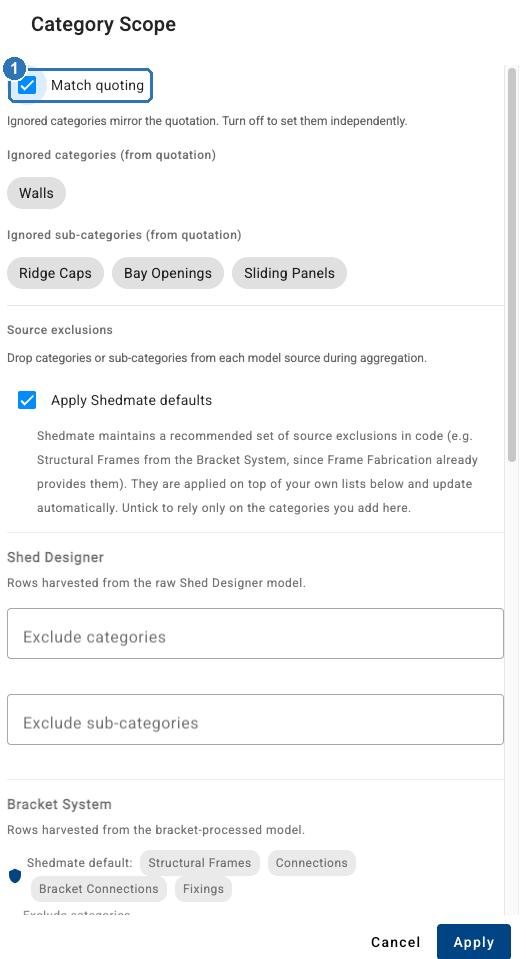
**C. It is charged another way, and it is a virtual item.** Open the item and switch off **Required** (1). The ignore lists don't apply to virtual item rows. Don't switch it off for an item you need to charge for, because that hides a real gap.

**Keep the fix.** To keep it on this job, click **Save Quoting**. To give it to everyone, save your database. Before you do, check your job is on the latest version of your database, because saving from an older job can overwrite your team's changes. Then reopen the job. If the red exclamation mark is still there, check the items again.
**Who is held back.** In **Calculation Settings**, **Restrict "Point of sales" from quoting when missing items in calculations** (1) decides whether salespeople can continue past the prompt. ShedMate still warns them either way. Switching it off lets a short quote go out.

### On ShedMate Lite
On ShedMate Lite, **New Calculation**, **New Item** and **New Variable** are greyed out, so the company admin steps above that use them aren't available to you. Ask us to look at it with you. Send us what is listed under "What to tell your company admin or us".
Stuck? Email support@shedmate.com.au with the job number and the report.
- [Introduction to Shedmate (How does it work)](https://help.shedmate.com.au/knowledge/introduction-to-shedmate-how-does-it-work?hsLang=en#main-content)
- [Introduction and useful information](https://help.shedmate.com.au/knowledge/introduction-to-shedmate-how-does-it-work?hsLang=en#introduction-and-useful-information)
- [Workflow for Cold Formed x Structural Steel](https://help.shedmate.com.au/knowledge/introduction-to-shedmate-how-does-it-work?hsLang=en#workflow-for-cold-formed-x-structural-steel)
- [Frequent Asked Questions (FAQ)](https://help.shedmate.com.au/knowledge/frequent-asked-questions-faq?hsLang=en)
- [Release Notes](https://help.shedmate.com.au/knowledge/release-notes?hsLang=en#main-content)
- [2025](https://help.shedmate.com.au/knowledge/release-notes?hsLang=en#2025)
- [2024](https://help.shedmate.com.au/knowledge/release-notes?hsLang=en#2024)
- [2026](https://help.shedmate.com.au/knowledge/release-notes?hsLang=en#2026)
- [Setting up Shedmate](https://help.shedmate.com.au/knowledge/setting-up-shedmate?hsLang=en#main-content)
- [Getting Started](https://help.shedmate.com.au/knowledge/setting-up-shedmate?hsLang=en#getting-started)
- [Setting up Shedmate Costing (COURSE)](https://help.shedmate.com.au/knowledge/setting-up-shedmate-costing-course?hsLang=en#main-content)
- [Introduction to Cost Engineering & Shedmate](https://help.shedmate.com.au/knowledge/setting-up-shedmate-costing-course?hsLang=en#introduction-to-cost-engineering-shedmate)
- [Starting from Scratch - A necessary learning practice](https://help.shedmate.com.au/knowledge/setting-up-shedmate-costing-course?hsLang=en#starting-from-scratch-a-necessary-learning-practice)
- [Fast-Tracking Your Pricing Setup with Pre-Built Templates](https://help.shedmate.com.au/knowledge/setting-up-shedmate-costing-course?hsLang=en#fast-tracking-your-pricing-setup-with-pre-built-templates)
- [Integrations and API](https://help.shedmate.com.au/knowledge/integrations-and-api?hsLang=en)
- [Designing Shed Projects](https://help.shedmate.com.au/knowledge/designing-shed-projects?hsLang=en#main-content)
- [Doors and Openings](https://help.shedmate.com.au/knowledge/designing-shed-projects?hsLang=en#doors-and-openings)
- [Quoting A Shed Project](https://help.shedmate.com.au/knowledge/quoting-a-shed-project?hsLang=en)
- [Preparing for Fabrication and Delivery](https://help.shedmate.com.au/knowledge/preparing-for-fabrication-and-delivery?hsLang=en)
- [Setting up Pricing in Shedmate (course)](https://help.shedmate.com.au/knowledge/introduction-to-shedmate-costing-course)
- [Frequent Asked Questions](https://help.shedmate.com.au/knowledge/frequent-asked-questions)
- [Setting up Shedmate](https://help.shedmate.com.au/knowledge/setting-up-your-enquiry-system-for-marketing-usage-qr-codes)
- [Integrations](https://help.shedmate.com.au/knowledge/trimble-tekla-structures-integration)
[](http://www.shedmate.com.au)
1 James St, Mount Gambier 5290
South Australia
[mailto:support@shedmate.com.au](mailto:support@shedmate.com.au)
Copyright © 2025, Shedmate