
Short answer: give your customer the plans from Export, your builder the General Assembly Plans Only set, and your council the Form 15 certificate and engineering package that are emailed to you once the job is certified. Plans from Export are not certified, and they are not approval-ready on their own.
Before you send any plans
- Check the engineering status line at the bottom of the Shed Designer
- Plans for your customer come from Export
- Plans for your builder come from Brackets, then PDFs
Which plan goes to whom
| Document | Who it is for | Where to find it |
|---|---|---|
| Quotation Plans and Architectural Plans | Your customer | Shed Designer, Export. Not certified |
| General Assembly Plans Only | Your builder on site | Brackets, then PDFs |
| Engineering Plans | Checking the engineering against the model | Brackets, then PDFs. Made from the model as it is now |
| Form 15 certificate and the engineering package | Your council, your surveyor and your builder | Emailed to you to download, once the job is certified |
Plans for your customer
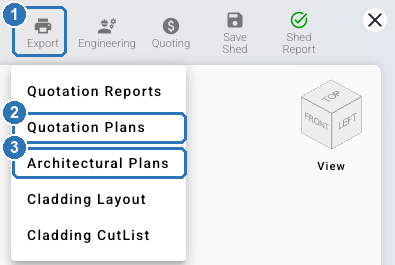
In the Shed Designer, click Export (1). Choose Quotation Plans (2) or Architectural Plans (3).
Plans for your builder
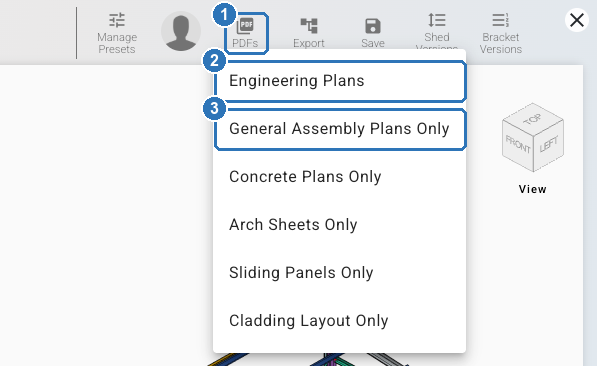
On the job page, click Brackets. In the Bracket System, click PDFs (1). General Assembly Plans Only (3) is the set for your builder. The same menu has Engineering Plans (2) and sets for concrete, arch sheets, sliding panels and cladding layout.
The brackets must come from the latest version of the shed. See How do I convert my shed in the Bracket System?
Check part marks before you hand plans to your builder. The marks on the Engineering Plans are typical marks. Two members with the same specification can carry the same mark, even when their punching differs. Use the General Assembly Plans Only set on site.
Preliminary or certified
At quote stage, your engineering is preliminary. Frame sizes and the price are subject to engineering confirmation, so tell your customer that. You can send the quote and the plans from Export. These plans are not certified.
Certification is a separate step. To request it, open Engineering in the Shed Designer and click Request Eng. Compliance Reports (or Request Custom Eng. Compliance Reports). It is paid, so request it once your customer has agreed. The job needs a site plan first. While the request is with ShedMate engineering, the status line reads Engineering Certification Requested. When the job is certified, it reads Engineering Certified.
What you receive. A Form 15 certificate signed by ShedMate's engineer of record, and the engineering package: the certified plans for construction, emailed to you to download. ShedMate lists the certified set as architectural plans, site and location plans, wind analysis results, structural engineering plans and engineering reports.

Send your council and surveyor the certified set only: the Form 15 and the engineering package from the email. A plan with "Engineering" in its name is not certified by that alone: the Engineering Plans under PDFs come from the model as it is now.
Your company manages council approval. ShedMate can't promise that plans will be approved.
Can't see Brackets or Export? Ask your company admin to check your access.
Related
- What does my engineering status mean, and what do I do? covers each status line.
- How do I convert my shed in the Bracket System? covers the conversion the builder's plans come from.
Stuck? Email support@shedmate.com.au with the job number.