
Short answer: each rule says which steel it's for, how each member is cut, and a list of holes. Each hole is one row: how far along the member it is (X), which face it's on (Type), whether it's a pair (Double), the bolt, and where X is measured from.
The parts of a rule
Open Manage Presets, click a group on the left and scroll to an entry.
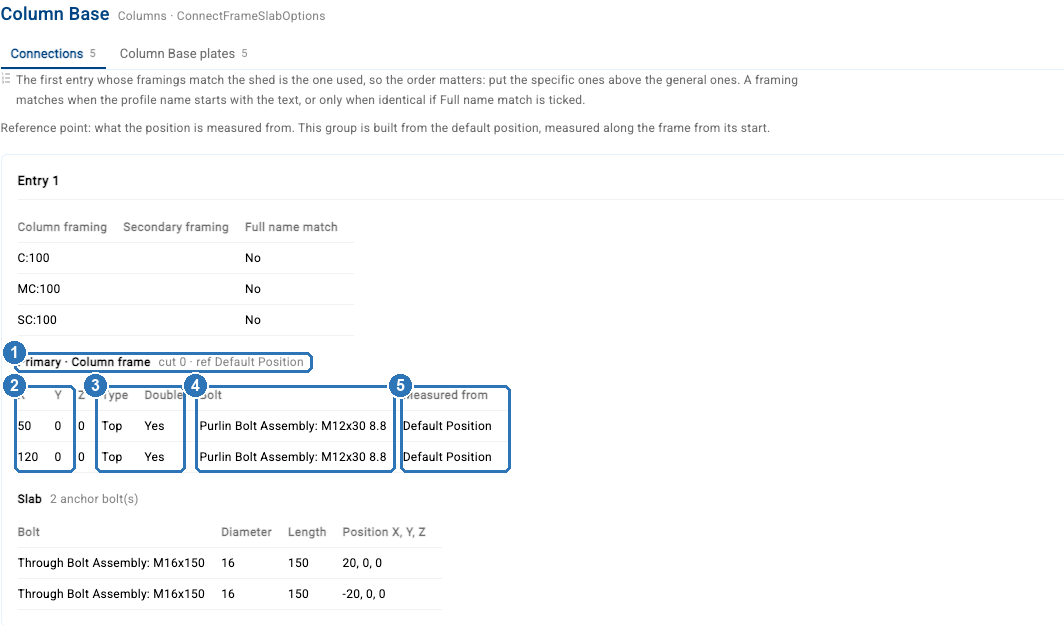
| Part | What it means | |
|---|---|---|
| 1 | Frame line | Which member these holes are in (here the column), how much it is cut (cut, in mm) and the reference point for the cut |
| 2 | X | Where the hole is along the member, in mm, measured from the point in Measured from. Negative numbers are allowed. Newer screens call this column Position. Y and Z don't move the hole: leave them at 0 |
| 3 | Type and Double | Top and Bottom punch a flange, Web punches the web. Double gives a pair of holes; unticked gives one |
| 4 | Bolt | The bolt for that hole, picked from ShedMate's list |
| 5 | Measured from | The point X is measured from. Default Position is the start of the member; the other options depend on the group |
Every X is measured from the same point, not from the hole before it. A rule with rows at 50 and 120 has holes 50 mm and 120 mm from that point.
Holes follow the member
Every hole is placed in the member's own terms, not the shed's. X always runs along the member's length: up a column, along the slope of a rafter, along a girt or purlin. That's the same for web holes, centre-line holes and flange holes, on C and Z sections alike. Which flange is Top or Bottom, and which way a Double pair runs, follow the member too.
Single and paired holes in the web
Double on a Web row gives two holes across the depth of the member, one towards each flange. Seen from the front of the shed, that's one above the other on a rafter and side by side on a column. The gap between them depends on the size of the member:
| Member size | 150 | 200 | 250 | 300 | 350 |
|---|---|---|---|---|---|
| Gap between a Double pair | 60 mm | 110 mm | 160 mm | 210 mm | 260 mm |
On a 250 member, that puts the pair 45 mm in from each flange. Untick Double for a single hole on the centre line of the web. Those are the only two positions a web hole can take across the web.
Rules with two members
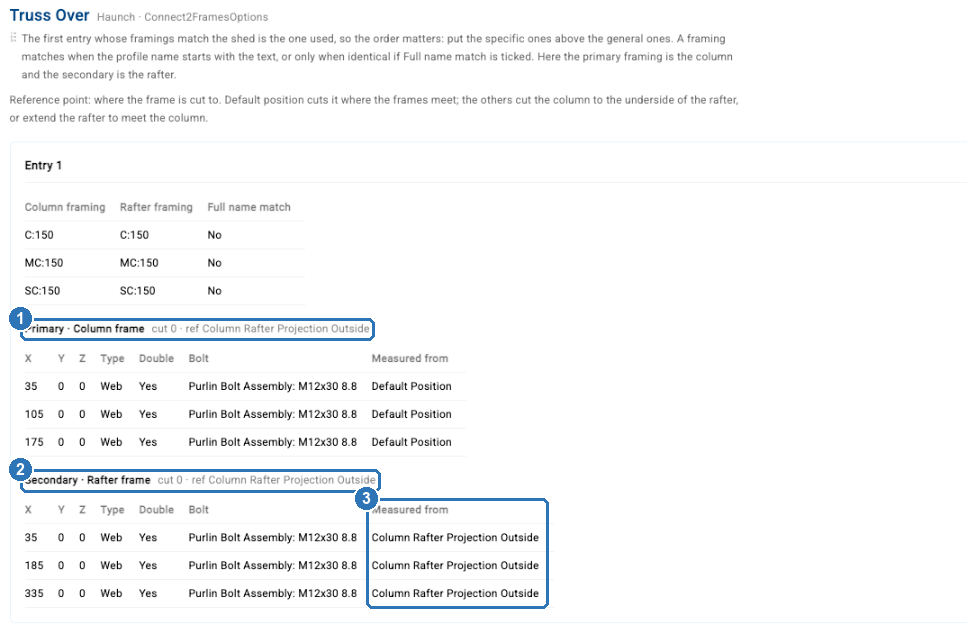
Connections like Truss Over join two members, so the rule has a block for each one: the column (1) and the rafter (2). Each block has its own cut, reference point and holes. Here the rafter holes are measured from Column Rafter Projection Outside (3), a point worked out from where the column meets the rafter, rather than from the end of the rafter.
Which rule a shed uses
ShedMate uses the first entry, from the top, whose framings match the members in the shed. A framing matches when the profile name starts with what's typed (MC:250 matches every MC250 gauge), unless Full name match is ticked. If no entry matches, that connection gets no holes and no cut.
An entry can list several framings, and any one of them matching is enough. A blank framing matches anything, so an entry with one catches every size: keep it at the bottom of the group. In Edit, move an entry with its up and down arrows, or drag it by its handle.
When you open Manage Presets from a job, the entries that job uses are tagged Used for this shed. It's the quickest way to find the rule behind what you see in 3D.
Next in this series: How do I change where holes are punched?
Questions? Email support@shedmate.com.au.