---
title: 19/12/2025 – Instant Quoting Improvements, Internal Walls for Awnings and Cladding Layout Directions.
description: "Shedmate’s Upgrade: Sleeker Menus, New Custom Engineering Interface, Smarter Marketing & Project Management Tools"
---
[Skip to content](https://help.shedmate.com.au/knowledge/04/02/2025-0-0-0#main-content)
English
Show submenu for translations

- [Setting up Pricing in Shedmate (course)](https://help.shedmate.com.au/knowledge/introduction-to-shedmate-costing-course)
- [Frequent Asked Questions](https://help.shedmate.com.au/knowledge/frequent-asked-questions)
- [Setting up Shedmate](https://help.shedmate.com.au/knowledge/setting-up-your-enquiry-system-for-marketing-usage-qr-codes)
- [Integrations](https://help.shedmate.com.au/knowledge/trimble-tekla-structures-integration)
Open main navigation
Close main navigation
- [Setting up Pricing in Shedmate (course)](https://help.shedmate.com.au/knowledge/introduction-to-shedmate-costing-course)
- [Frequent Asked Questions](https://help.shedmate.com.au/knowledge/frequent-asked-questions)
- [Setting up Shedmate](https://help.shedmate.com.au/knowledge/setting-up-your-enquiry-system-for-marketing-usage-qr-codes)
- [Integrations](https://help.shedmate.com.au/knowledge/trimble-tekla-structures-integration)
- English
Show submenu for translations
- Contact us
Contact us
How can we help you?
- There are no suggestions because the search field is empty.
1. [Help Center](https://help.shedmate.com.au/knowledge?hsLang=en)
2. [Release Notes](https://help.shedmate.com.au/knowledge/release-notes?hsLang=en)
3. [2025](https://help.shedmate.com.au/knowledge/release-notes?hsLang=en#2025)
# 19/12/2025 – Instant Quoting Improvements, Internal Walls for Awnings and Cladding Layout Directions.
## Quote Smarter and Set Up Faster: New Instant Quoting and Layout Improvements
**Shedmate Just Got Better:** Smarter Instant Quoting, Easier Setup, and Clearer Designs
---
### **📢 Welcome to Shedmate’s December Release Notes! 🚀**
This update is designed to make your day-to-day work easier — **from faster quoting and easier pricing decisions to clearer layouts** that improve accuracy on-site.
**Before diving into what’s new, take a sneak peek at what’s coming next in Shedmate!**
---
### ⏭️ **Upcoming Releases**
**Coming Soon: Smarter Engineering Drawings & More Powerful Calculations**
We’re working behind the scenes to take Shedmate’s engineering capabilities to the next level. Upcoming improvements will introduce clearer, more detailed engineering drawings and significantly more powerful shed computations — opening the door to support for hay sheds, garaports, carports, and other new structural configurations. These enhancements are designed to give you greater confidence in complex designs, while keeping your workflows simple and efficient.
Stay tuned! We’re continuing to roll out powerful improvements to help your business design, quote, and build with confidence.
---
### ✅**What’s New**
**Here’s what’s new in this release:**
- **Enhanced Variable Management & Conditional Options** — select, duplicate, and manage multiple variables at once, with simple yes/no conditions that make quoting faster and more flexible.
- **New Group Editing Features** — rename, recolor, and control pricing groups directly, with changes applied instantly across all related items.
- **New Point of Sales Restriction Options** — decide exactly what sales users can see, keeping pricing details clean, focused, and professional.
- **Improved Point of Sales Navigation** — the Reports tab now comes first, making document generation quicker and easier.
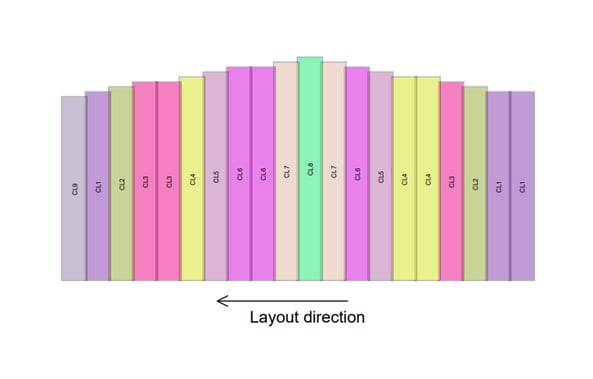
- **Clearer Cladding Layouts — Direction & Starting Point Shown** — installers can instantly see cladding orientation and starting position, reducing confusion on site.
- **Internal Walls for Awnings** — add internal walls to awnings just like a main shed for more accurate layouts and better design flexibility.
**Take a look below to explore all the new features in detail!**
---
### **New Instant Quoting Features — Flexible Variables and Faster Pricing Decisions**
We’ve made powerful improvements to **Instant Quoting**, so you can manage pricing logic more easily and give your sales team clearer control over what’s included in a quote.
This section will be divided into 4 parts to ensure every topic is covered in detail!
You can dive into the videos we prepared or keep reading the information below for a step-by-step procedure.
### Part 1: Enhanced Variable Management and Conditional Options
🎥 **Watch the Explanation Video**
PART 1 — [Enhanced Variable Management and Conditional Options](https://www.loom.com/share/6ba9ff9c455e4d5ba31bc65e5bd00eb7)
**What’s New**
Instant Quoting now gives you more flexibility when working with pricing variables:
- **Select multiple variables at once**, just like in Excel.
- **Duplicate or delete variables in bulk** to speed up setup and maintenance.
- Create **Yes / No variables** that control pricing logic without complex formulas.
💡 *Why this matters:* Managing large costing templates is now faster, cleaner, and far less repetitive.
If your pricing database includes many variables, this update will save you time immediately.
You can now:
- Scroll through your variables list.
- Select several variables at once.
- Duplicate or delete them in one action.
This makes it much easier to clean up unused variables or build new pricing setups quickly.

**Yes / No Options for Smarter Quotes**
You can now create simple **Yes / No questions** that sales staff can toggle per shed, such as:
- *Include labour?*
- *Add optional services?*
When the option changes, pricing updates instantly — totals and line items adjust automatically, with no manual recalculations.
Open the group section and create a Yes/No Variable by selecting the condition options. After that, link it with one of the groups:
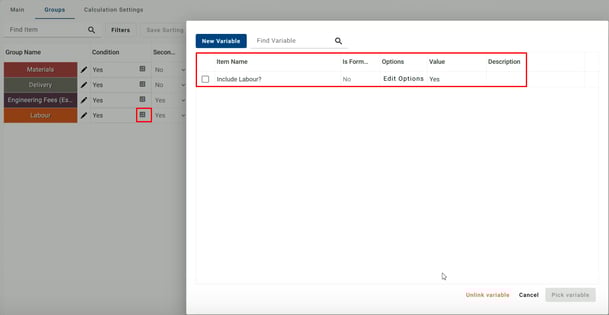
You can now check that when changing the variable's value, the group price can be not considered.

**Conditional Pricing Made Simple**
Yes / No variables can control:
- **Entire pricing groups** (for example, labour or installation, as shown before), or
- **Individual line items** (for example, include or RHS Columns fabrication)

This replaces old discount-based workarounds with clean, transparent pricing logic — making quotes easier to understand and explain to customers.
**Sales-Friendly Controls**
You can mark variables as **public**, making them visible in the Sales View. You just need to select the option related to the Public variable as **Yes.**
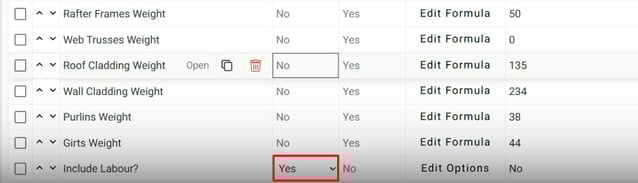
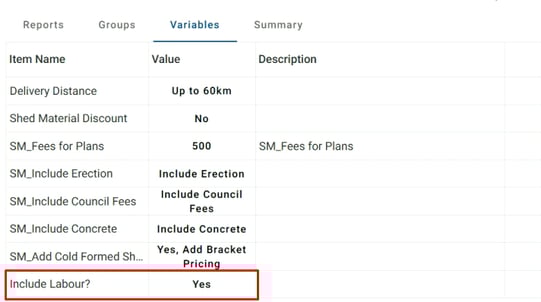
This allows your sales team to:
- Toggle inclusions confidently.
- See real-time pricing changes.
- Prepare accurate quotes without needing technical knowledge of the pricing setup.
**How This Helps You**
- **Speed** — Faster setup and maintenance of pricing databases.
- **Flexibility** — Easily include or exclude costs per project.
- **Accuracy** — Cleaner logic, fewer errors, clearer quotes.
- **Better Sales Experience** — Simple controls for sales staff, powerful logic behind the scenes.
💡 **Try the new Instant Quoting variable controls today** and see how much easier it is to manage flexible pricing in Shedmate.
---
### Part 2: New Group Editing Features
🎥 **Watch the Explanation Video**
PART 2 — [New Group Editing Features](https://www.loom.com/share/f34d19560c7f4ed39bf4947a3f6738a4)
We’ve made Instant Quoting even more powerful by improving how **pricing groups** work — so you can organise costs faster, control pricing logic more clearly, and keep your quotes easy to manage.
This update builds on the new **Yes / No variables**, giving you better control at both **group** and **item** level.
**Faster Group Editing**
You can now edit pricing groups **directly where you work** — no need to jump back and forth between item lists.
With just a few clicks, you can:
- Rename pricing groups instantly.
- Change group colours for better visual organisation.
- Apply updates automatically to all items and calculations linked to that group.

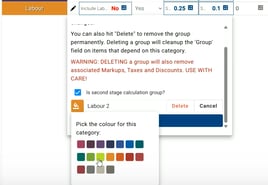
*Why this matters:* Clearer group names and colours make complex quotes easier to understand and maintain.
💡 **Try the new Group Editing and Conditional Controls today** and experience cleaner, smarter Instant Quoting in Shedmate.
---
### Part 3: New "Point of sales" restriction options
🎥 **Watch the Explanation Video**
PART 3 — [New "Point of sales" restriction options](https://www.loom.com/share/745ad2af5e054508919d5fc6cb61e95b)
Instant Quoting now includes more flexibility around **hiding or showing tabs** like Groups, Variables, and Summary.
You can access this by selecting the Pricing and Calculation Tab on instant quoting and selecting the Calculating Settings.
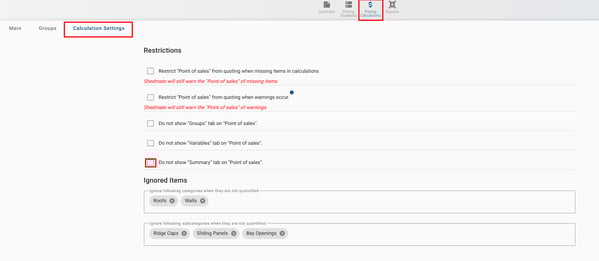
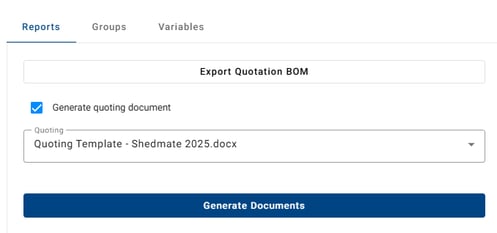
You will notice that you can apply some restrictions to the groups. Keep in mind that even if you delete them, they will be displayed in the documents as quoting and contracts.
In short:
- Cleaner interface
- Better alignment with real sales workflows
### Part 4: Adjusted the position of the "Report" tab on "Point of Sales"
🎥 **Watch the Explanation Video**
PART 4 — [Adjusted the position of the "Report" tab on "Point of Sales"](https://www.loom.com/share/5bc3b59836794479a88f670ec4a3cf18)
We’ve made a small usability improvement in **Instant Quoting** to keep things fast and focused for your sales workflow.
Previously, when you opened Instant Quoting, you would land on the **Groups** tab. Now, the **Reports** tab opens first, as this is the only Tab that cannot be deleted; all the other ones are editable.
---
### **Clearer Cladding Layouts — Direction & Starting Point Shown**
To make cladding installation easier, we’ve improved how cladding layouts are shown in your **Cladding Layout Documents**.
Based on the cladding layout you choose in Shedmate, your drawings will now clearly display:
- An arrow showing the **direction of cladding installation**
- A label indicating **where the cladding starts**
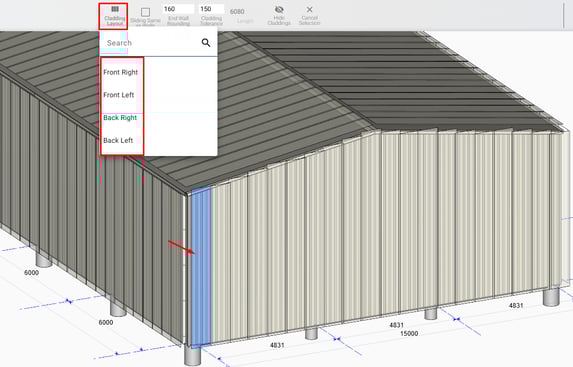
To set the options, you need to change to the cladding's visibility and click on wall cladding. That you can select the available directions**.**
****
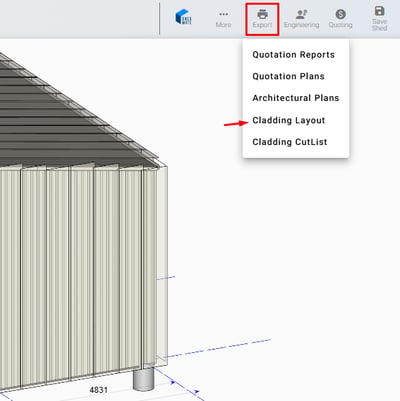
After that you can download the Cladding Layout by accesing the Export option and then Cladding Layout. After downloading the direction you choose will be displayed on plans.
### 
**Why You’ll Love This**
These visual cues remove guesswork on site, making it easier for installers to:
- Quickly understand panel orientation
- Start cladding from the correct point
- Avoid installation mistakes or rework
The result? Clearer drawings, smoother installs, and more confidence from design through to construction.
---
### **Internal Walls for Awnings**
Designing awnings just got more flexible. You can now add **internal walls directly inside awnings**, making it easier to create accurate layouts that match real-world use cases.
This update gives you the same level of control in awnings that you already have in the main shed — no workarounds needed.
This update gives you the same level of control in awnings that you already have in the main shed — no workarounds needed.
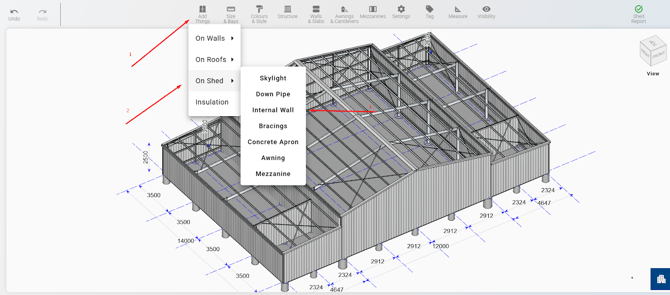
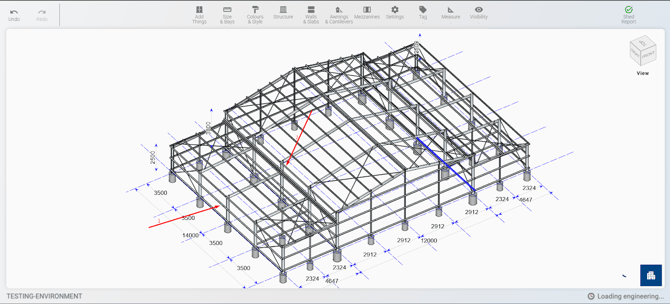
**Option 1: Add Things Menu**
- Open **Add Things**
- Select **On Shed**
- Choose **Internal Walls**
- Click between two awning columns to place the wall
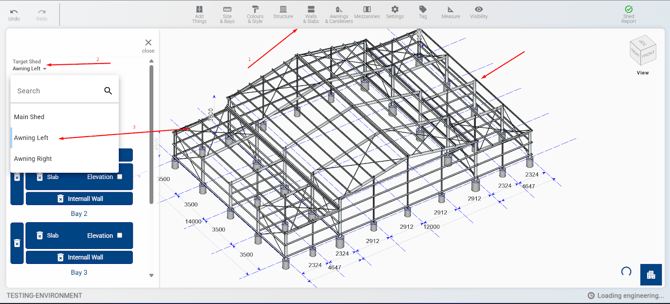
**Option 2: Walls & Slabs Menu**
- Open **Walls & Slabs**
- In **Target Shed**, select the awning
- Click the wall creation button for the bay where you want the wall
Why You’ll Love This
- **More accurate layouts** — model partitions exactly where they’re needed
- **Greater design flexibility** — ideal for storage areas, work zones, or enclosed awning spaces
- **Consistent workflow** — use the same tools you already know from the main shed
---
**Let’s Build the Future of Sheds—Together!** 🛠️💥
*Your Shedmate Team*
---
**P.S.** Got feedback? We’re all ears! Chat with our support team (support@shedmate.com.au). 💌
- [Introduction to Shedmate (How does it work)](https://help.shedmate.com.au/knowledge/introduction-to-shedmate-how-does-it-work?hsLang=en#main-content)
- [Introduction and useful information](https://help.shedmate.com.au/knowledge/introduction-to-shedmate-how-does-it-work?hsLang=en#introduction-and-useful-information)
- [Workflow for Cold Formed x Structural Steel](https://help.shedmate.com.au/knowledge/introduction-to-shedmate-how-does-it-work?hsLang=en#workflow-for-cold-formed-x-structural-steel)
- [Frequent Asked Questions (FAQ)](https://help.shedmate.com.au/knowledge/frequent-asked-questions-faq?hsLang=en)
- [Release Notes](https://help.shedmate.com.au/knowledge/release-notes?hsLang=en#main-content)
- [2025](https://help.shedmate.com.au/knowledge/release-notes?hsLang=en#2025)
- [2024](https://help.shedmate.com.au/knowledge/release-notes?hsLang=en#2024)
- [2026](https://help.shedmate.com.au/knowledge/release-notes?hsLang=en#2026)
- [Setting up Shedmate](https://help.shedmate.com.au/knowledge/setting-up-shedmate?hsLang=en#main-content)
- [Getting Started](https://help.shedmate.com.au/knowledge/setting-up-shedmate?hsLang=en#getting-started)
- [Setting up Shedmate Costing (COURSE)](https://help.shedmate.com.au/knowledge/setting-up-shedmate-costing-course?hsLang=en#main-content)
- [Introduction to Cost Engineering & Shedmate](https://help.shedmate.com.au/knowledge/setting-up-shedmate-costing-course?hsLang=en#introduction-to-cost-engineering-shedmate)
- [Starting from Scratch - A necessary learning practice](https://help.shedmate.com.au/knowledge/setting-up-shedmate-costing-course?hsLang=en#starting-from-scratch-a-necessary-learning-practice)
- [Fast-Tracking Your Pricing Setup with Pre-Built Templates](https://help.shedmate.com.au/knowledge/setting-up-shedmate-costing-course?hsLang=en#fast-tracking-your-pricing-setup-with-pre-built-templates)
- [Integrations and API](https://help.shedmate.com.au/knowledge/integrations-and-api?hsLang=en)
- [Setting up Pricing in Shedmate (course)](https://help.shedmate.com.au/knowledge/introduction-to-shedmate-costing-course)
- [Frequent Asked Questions](https://help.shedmate.com.au/knowledge/frequent-asked-questions)
- [Setting up Shedmate](https://help.shedmate.com.au/knowledge/setting-up-your-enquiry-system-for-marketing-usage-qr-codes)
- [Integrations](https://help.shedmate.com.au/knowledge/trimble-tekla-structures-integration)
[](http://www.shedmate.com.au)
1 James St, Mount Gambier 5290
South Australia
[mailto:support@shedmate.com.au](mailto:support@shedmate.com.au)
Copyright © 2025, Shedmate