
📢 Welcome to Shedmate’s April Release Notes!
We’ve just released a new Shedmate update focused on improving engineering efficiency, design flexibility, and project interoperability.
With updates to the Engineering Request workflow, support for Concrete Panels and Tapered Trusses, and IFC export directly from the Bracket System, your team can handle more project scenarios with greater speed and accuracy.
We’re also launching the Shedmate Q&A Webinar Series, hosted every Wednesday from 8:00 to 9:00 a.m. (Adelaide Time) on our YouTube channel, featuring practical demos, workflow guidance, and live conversations with our team and industry experts.
Because better workflows and better support lead to faster delivery, clearer collaboration, and better results for your clients.
⏭️ Upcoming Releases
-
Bracket System Update
- Ordering System Update
✅What’s New
Here’s what’s new in this release:
- Updated UI Engineering Request workflow
Improved the engineering request process for a smoother and more efficient user experience. -
Instant Quoting Bill of Materials Feature Update
Enhanced the Instant Quoting Bill of Materials feature to provide faster and more accurate material breakdowns for project estimation and planning. - Support for Concrete Panels
Added support for concrete panel configurations to expand structural design options. - Support for Tapered Truss configurations
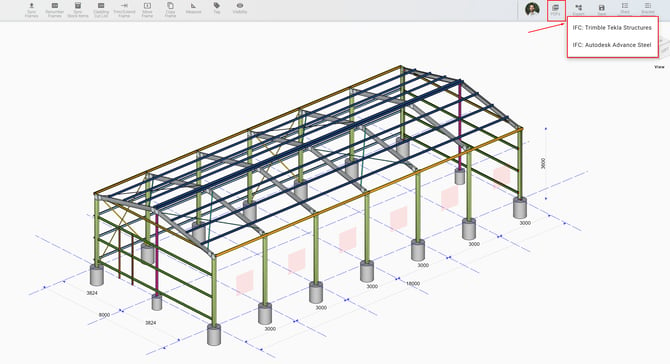
Introduced tapered truss support for greater flexibility in building designs. - IFC Exporter from the Bracket System
Enabled IFC export directly from the Bracket System to improve interoperability with external BIM and engineering platforms. - Shedmate Q&A Webinar Series
Join us every Wednesday from 8:00 to 9:00 a.m. (Adelaide Time) on our YouTube channel for live Q&A sessions featuring practical demos, workflow guidance, and direct conversations with our team and industry experts. Ask questions, improve your processes, and get more from Shedmate.
Faster and Smarter Engineering Requests
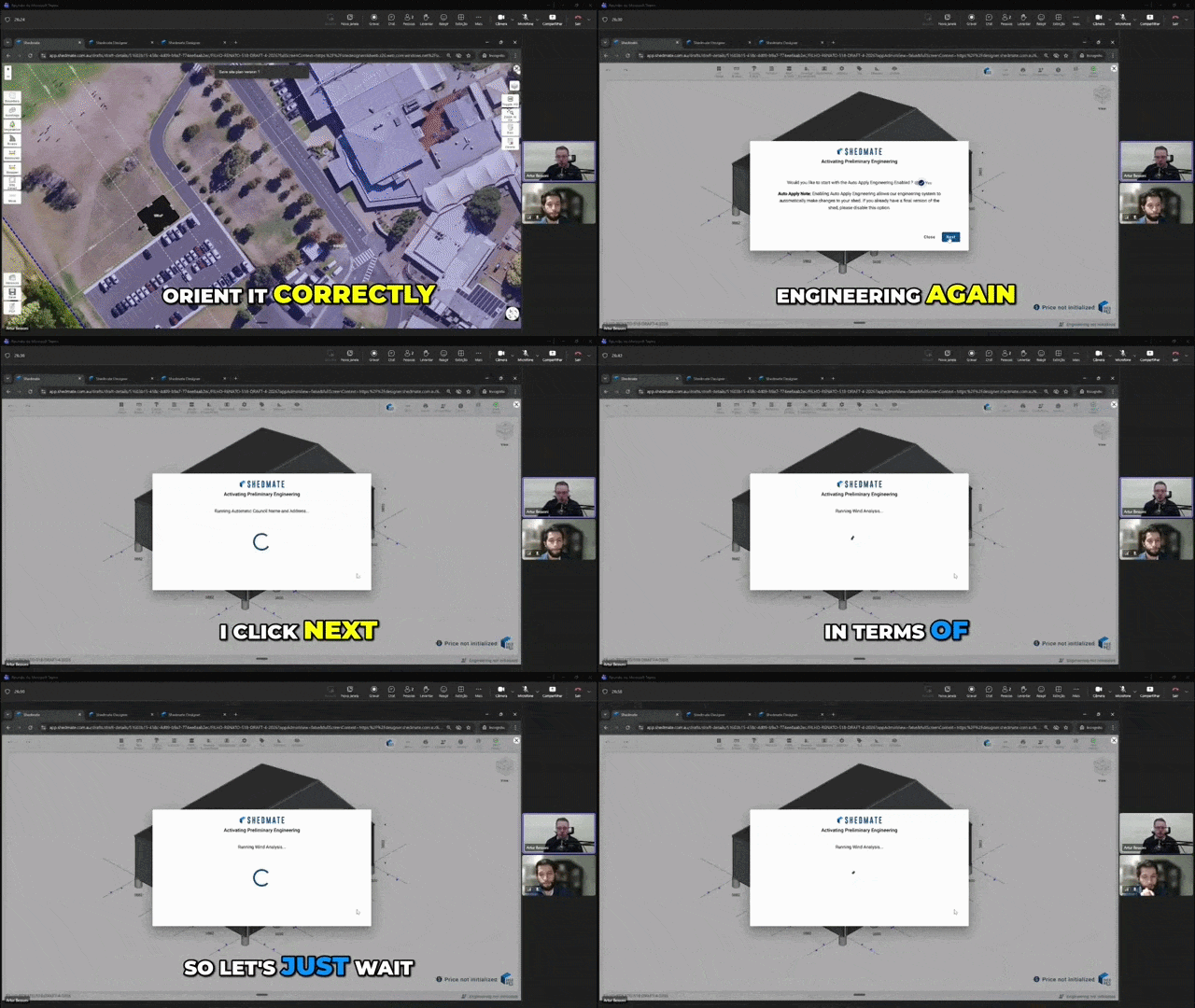
The new Engineering Request workflow makes the process faster, clearer, and more flexible for your team.
Companies can now choose between manual or automatic site-specific workflows, allowing Shedmate to generate engineering information in the background and reduce manual input.
The updated process also improves communication with your engineering team through direct feedback, adjustment requests, and certification interactions inside the workflow.
So you can:
- Reduce manual work
- Speed up engineering requests
- Improve communication with engineers
- Give your team more flexibility and control
🎥 See the new feature in action below. This is a short highlight from our latest webinar.
More Powerful Bill of Materials for Instant Quoting
What Changed in the New Bill of Materials Update
Expanded Bill of Materials Visibility
Previously, users could only see high-level calculation items.
Now, calculation items can be expanded to display detailed Bill of Materials information, including quantities, dimensions, mass, area, and other dynamic properties.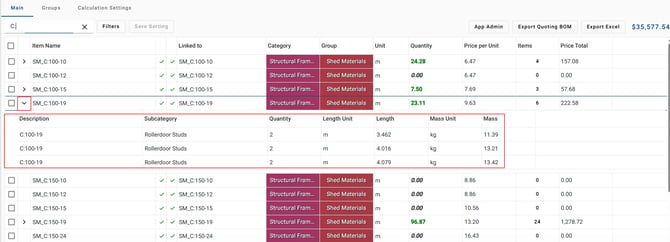
Support for Secondary Items
The old version mainly focused on items directly generated by Shedmate.
The new version now supports secondary items, allowing users to quantify and Generate BOM details for:
- Bolts
- Installation materials
- Custom company-specific items
- Formula-based quantities
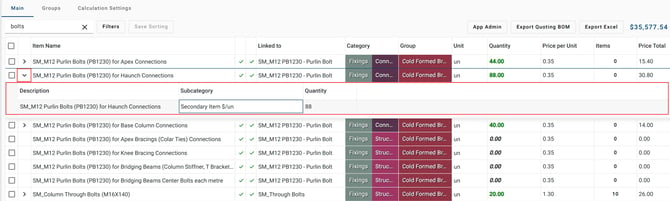
This gives companies much greater flexibility in their estimating workflows.
Customizable Unit Settings
Users can now customize measurement units directly inside the Bill of Materials settings. For example, Roller Doors can be displayed and quantified using Area, Width, and Height in the units that best match your workflow.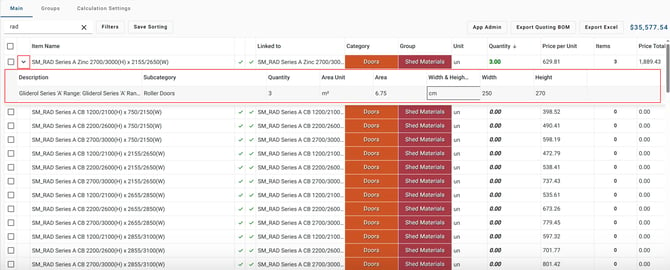
All unit preferences are automatically saved and reused for future quotes, creating a more consistent and efficient estimating process.
Improved Excel Export
The Excel export has been significantly enhanced with:
- Dynamic columns
- Better formatting
- Support for secondary items
- Filtered exports for selected items only
Users can now generate more focused and accurate material reports, for example, select and export only some items: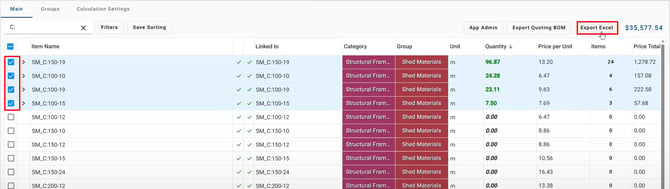
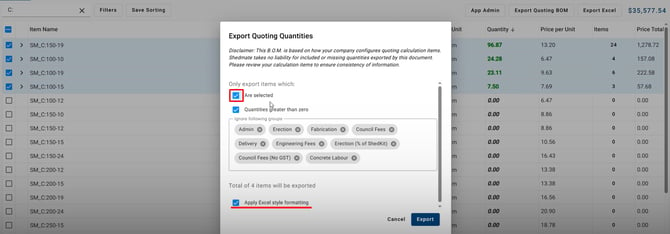

The difference between Export Quoting BOM and Export Excel is that the BOM export focuses only on material quantities and item details, while the Excel export also includes pricing information such as unit prices and total costs.
Better Preparation for Future Ordering Workflows
This update also lays the foundation for future ordering system features, allowing companies to generate orders for both native Shedmate items and fully customised materials.
New Concrete Panel Support for More Project Scenarios
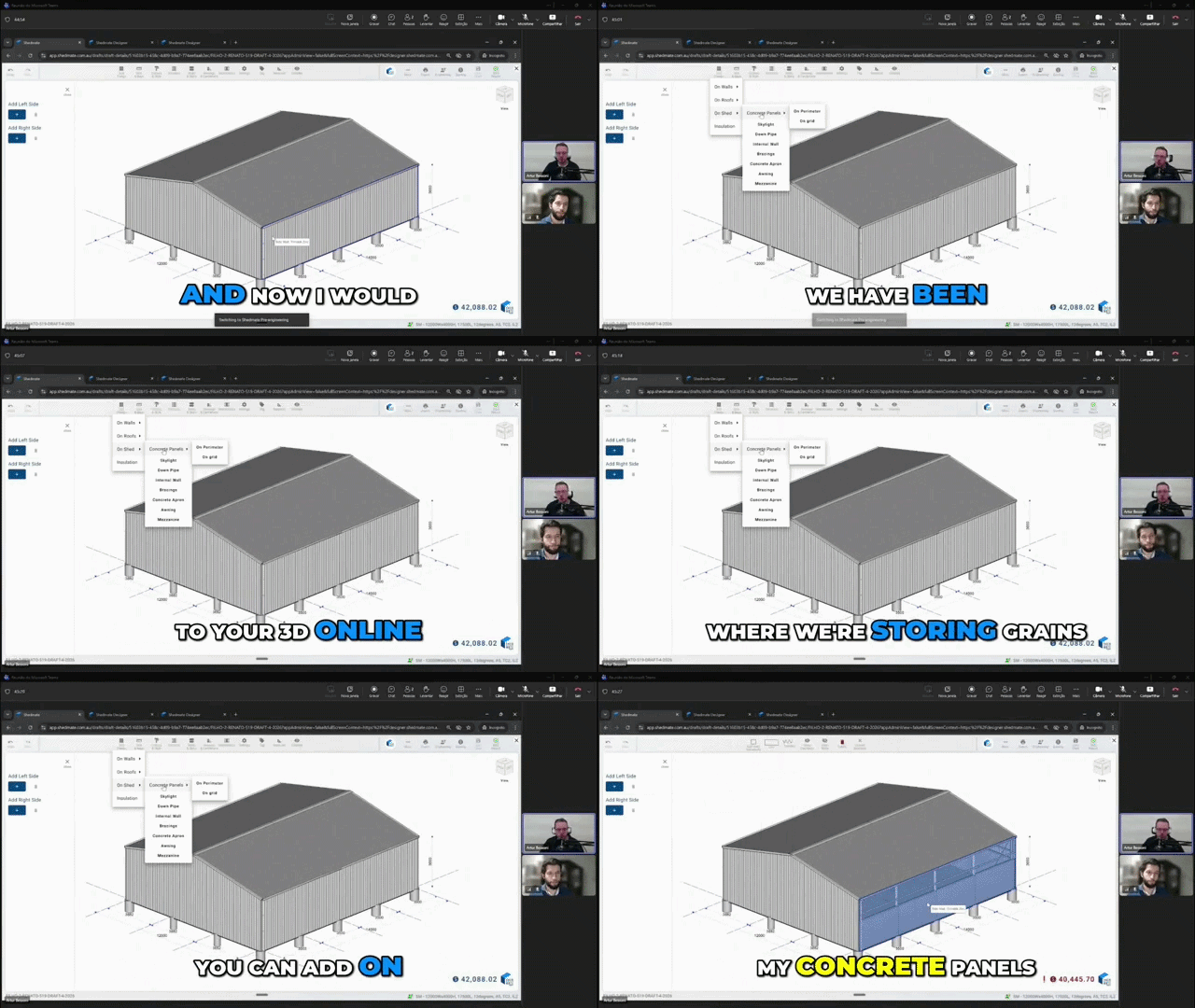
You can now add Concrete Panels directly inside Shedmate, giving your team more flexibility for projects like grain sheds and storage buildings.
Concrete Panels can be added around the perimeter or on specific grid lines, with customizable options for height, thickness, offset, reinforcement, and concrete strength.
The new workflow also allows you to remove individual panels and create custom openings for equipment access or internal building divisions.
So you can:
- Design more storage and grain shed configurations
- Customise concrete panel layouts with greater flexibility
- Improve project visualisation for your clients
- Create more accurate quoting and engineering setups
🎥 See how to use this new feature below.
📢Watch the full video here! :
Concrete Panels are now Available!
New Tapered Truss and Cantilever Support
Shedmate now supports Tapered Truss configurations, giving your team more flexibility for custom structural designs and cantilever applications.
You can choose between different truss types, including Parallel Cord, Half Truss, and Tapered Truss, with adjustable settings such as short-end ratios and cantilever dimensions.
The new workflow also allows cantilever awnings without front columns, helping you model more realistic and modern building layouts directly inside Shedmate.
So you can:
- Create more advanced structural designs
- Configure custom cantilever layouts
- Adjust truss geometry with greater flexibility
- Improve pricing accuracy with real-time updates
- Match engineering recommendations more closely
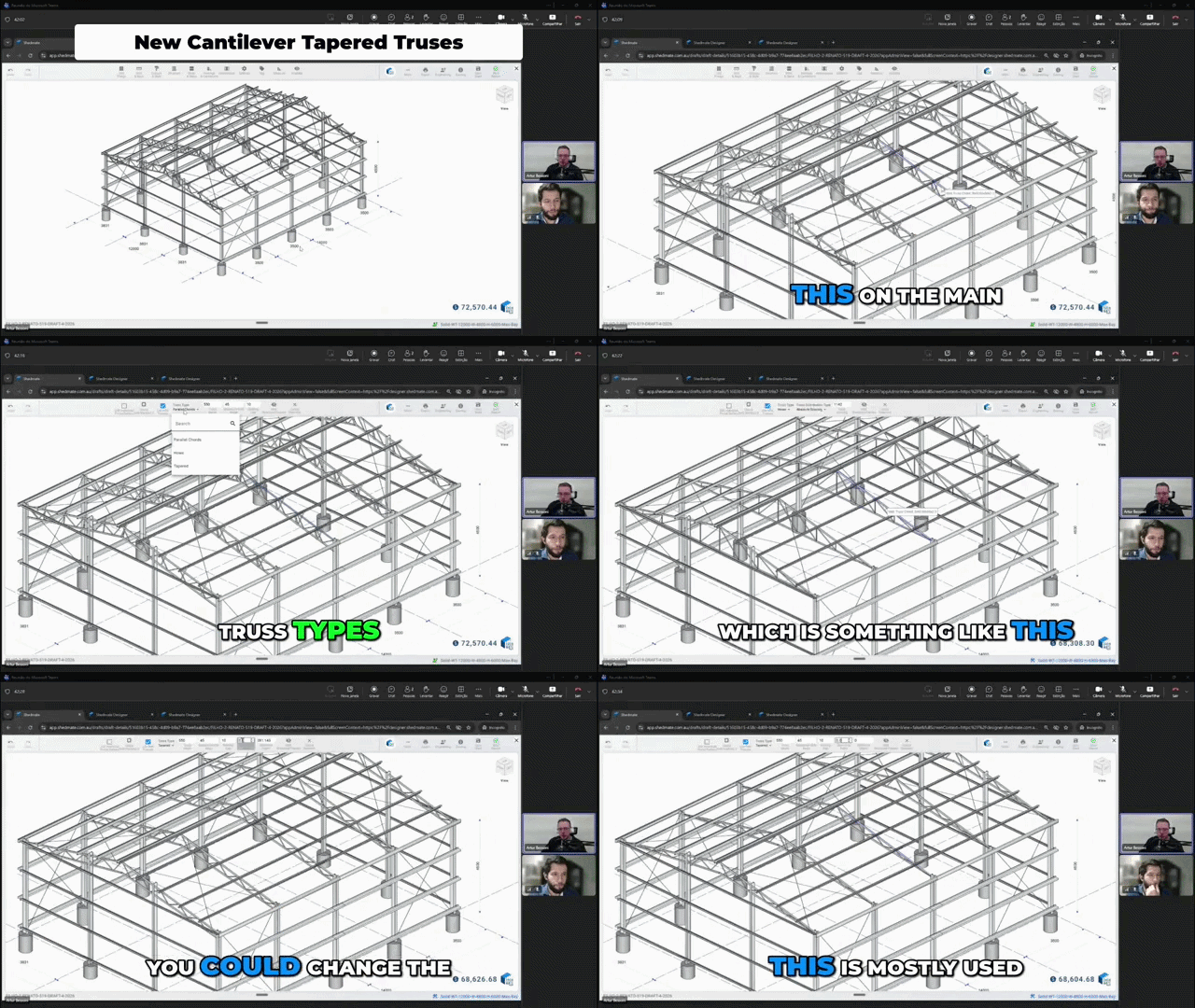
🎥 See the new feature in action below. This is a short highlight from our latest webinar:
New Tapered Truss and Cantilever Support
IFC Exporter from the Bracket System
You can now export IFC files directly from the Bracket System using the Bracket shed model instead of the Designer shed.
This new workflow makes it easier to start projects inside Shedmate and continue development in external BIM or engineering software when needed.
While brackets and punchings are not yet included in the IFC export, all frame modifications and structural adjustments are fully exported.
So you can:
- Export projects directly from the Bracket System
- Improve interoperability with external software
- Continue workflows in other BIM platforms
- Preserve frame modifications during export
Shedmate Q&A Webinar Series
We are launching the Shedmate Q&A Webinar Series to help customers get more value from the platform through practical demos, real workflow guidance, and live Q&A sessions with our team and industry experts.
These webinars are designed for sales, estimating, and operations teams looking to improve quoting speed, engineering workflows, and customer communication.
So you can:
- Learn practical Shedmate workflows
- Improve quoting and estimating processes
- Get direct answers from our team
- Build more efficient customer conversations
- Stay updated with new platform features
🎥 Join us every Wednesday from 8:00 to 9:00 a.m. (Adelaide Time) on our YouTube channel.
Subscribe to our YouTube channel and turn on notifications so you never miss new webinars, feature updates, and workflow tips:
Shedmate YouTube Channel
Let’s Build the Future of Sheds—Together! 🛠️💥
Your Shedmate Team
P.S. Got feedback? We’re all ears! Chat with our support team (support@shedmate.com.au). 💌