---
title: 02/04/2026 - Improved Company-Specific Engineering and Thumbnail for Shed Presets
description: "Shedmate’s Upgrade: Sleeker Menus, New Custom Engineering Interface, Smarter Marketing & Project Management Tools"
---
[Skip to content](https://help.shedmate.com.au/knowledge/02/03/2026-0-0-0-0-0#main-content)
English
Show submenu for translations

- [Setting up Pricing in Shedmate (course)](https://help.shedmate.com.au/knowledge/introduction-to-shedmate-costing-course)
- [Frequent Asked Questions](https://help.shedmate.com.au/knowledge/frequent-asked-questions)
- [Setting up Shedmate](https://help.shedmate.com.au/knowledge/setting-up-your-enquiry-system-for-marketing-usage-qr-codes)
- [Integrations](https://help.shedmate.com.au/knowledge/trimble-tekla-structures-integration)
Open main navigation
Close main navigation
- [Setting up Pricing in Shedmate (course)](https://help.shedmate.com.au/knowledge/introduction-to-shedmate-costing-course)
- [Frequent Asked Questions](https://help.shedmate.com.au/knowledge/frequent-asked-questions)
- [Setting up Shedmate](https://help.shedmate.com.au/knowledge/setting-up-your-enquiry-system-for-marketing-usage-qr-codes)
- [Integrations](https://help.shedmate.com.au/knowledge/trimble-tekla-structures-integration)
- English
Show submenu for translations
- Contact us
Contact us
How can we help you?
- There are no suggestions because the search field is empty.
1. [Help Center](https://help.shedmate.com.au/knowledge?hsLang=en)
2. [Release Notes](https://help.shedmate.com.au/knowledge/release-notes?hsLang=en)
3. [2026](https://help.shedmate.com.au/knowledge/release-notes?hsLang=en#2026)
# 02/04/2026 - Improved Company-Specific Engineering and Thumbnail for Shed Presets
## Move faster, reduce errors, and deliver a more professional experience to your clients. This release improves how you configure projects, helping you handle more scenarios with less effort, while better visual organisation makes it easier for your team to find the right designs quickly and avoid mistakes.
### **📢 Welcome to Shedmate’s March Release Notes! **
### **🚀 Quote Faster, Reduce Errors and Win More Jobs**
We’ve just released a new update in Shedmate focused on what really impacts your business.
Helping you respond faster, reduce mistakes, and deliver a better experience to your clients.
Because in this market, deals are not lost on price. They are lost on speed.
---
### **⏭️ Upcoming Releases**
- **Concrete Panels **
- **Bill of Materials (BOM) Improvements - Custom Itemised Lenghts for Ordering**
---
### ✅**What’s New**
**Here’s what’s new in this release:**
- **Find the right designs faster and avoid mistakes**
Better preset organisation and visual previews help your team quickly select the correct configurations without guesswork.
- **Handle more project scenarios without extra work**
You can now evaluate multiple conditions at once, reducing repetitive setup and speeding up your quoting process.
- **Apply the right engineering logic with confidence**
More flexible rule control allows you to match each project scenario accurately, avoiding incorrect assumptions and rework.
- **Update your setup faster and at scale**
Bulk editing through Excel makes it easier to manage large configurations, saving time and reducing manual errors.
---
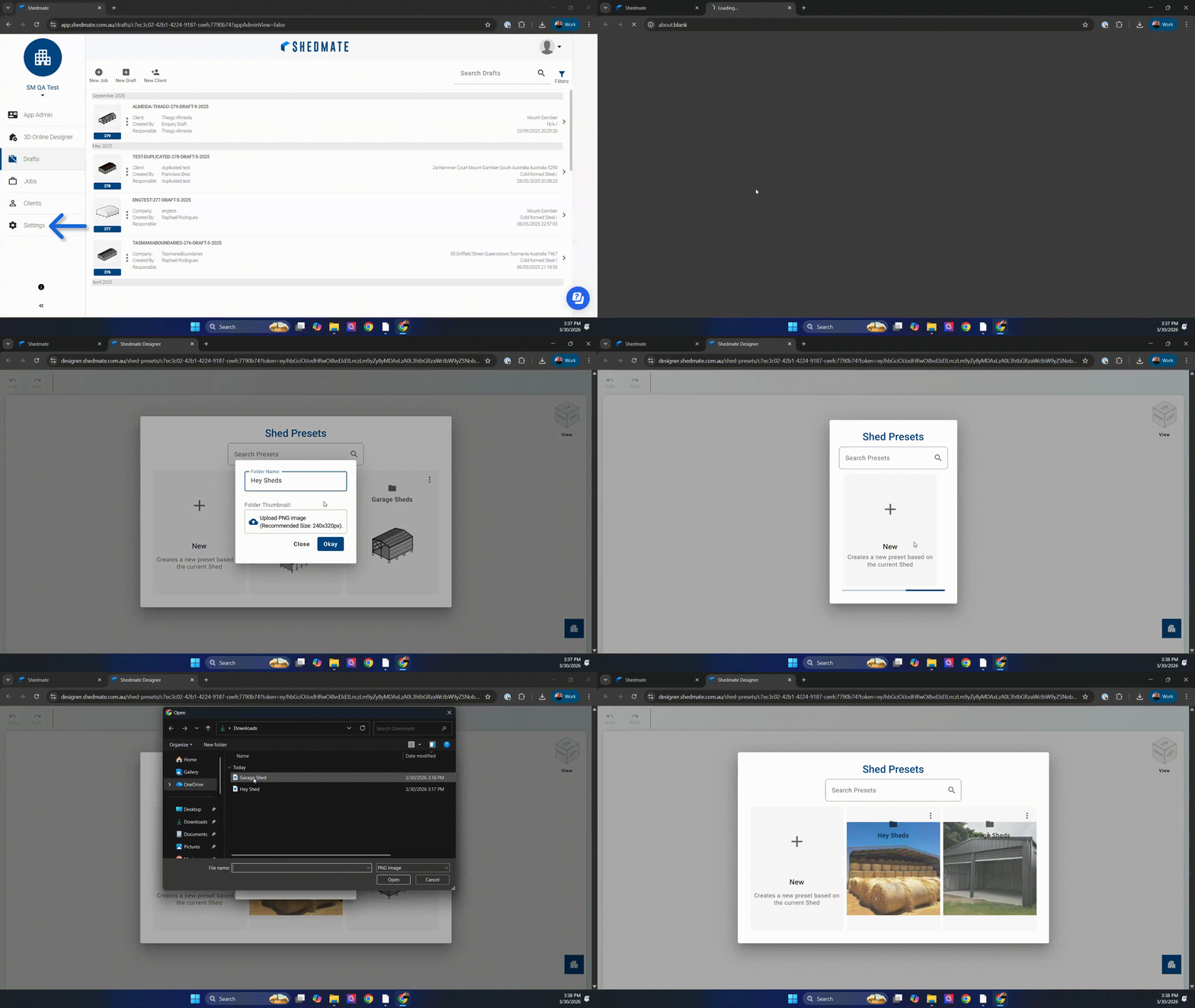
### **Improve your client experience with better visual organisation**
Your team can now find and select the right presets faster, without guessing or wasting time.
With improved preset management and visual thumbnails, everything becomes easier to navigate and understand.
So you can:
- Reduce errors when selecting designs
- Speed up your workflow
- Deliver a more professional experience to your clients
**🎥 See how to use this new feature below.**
****
---
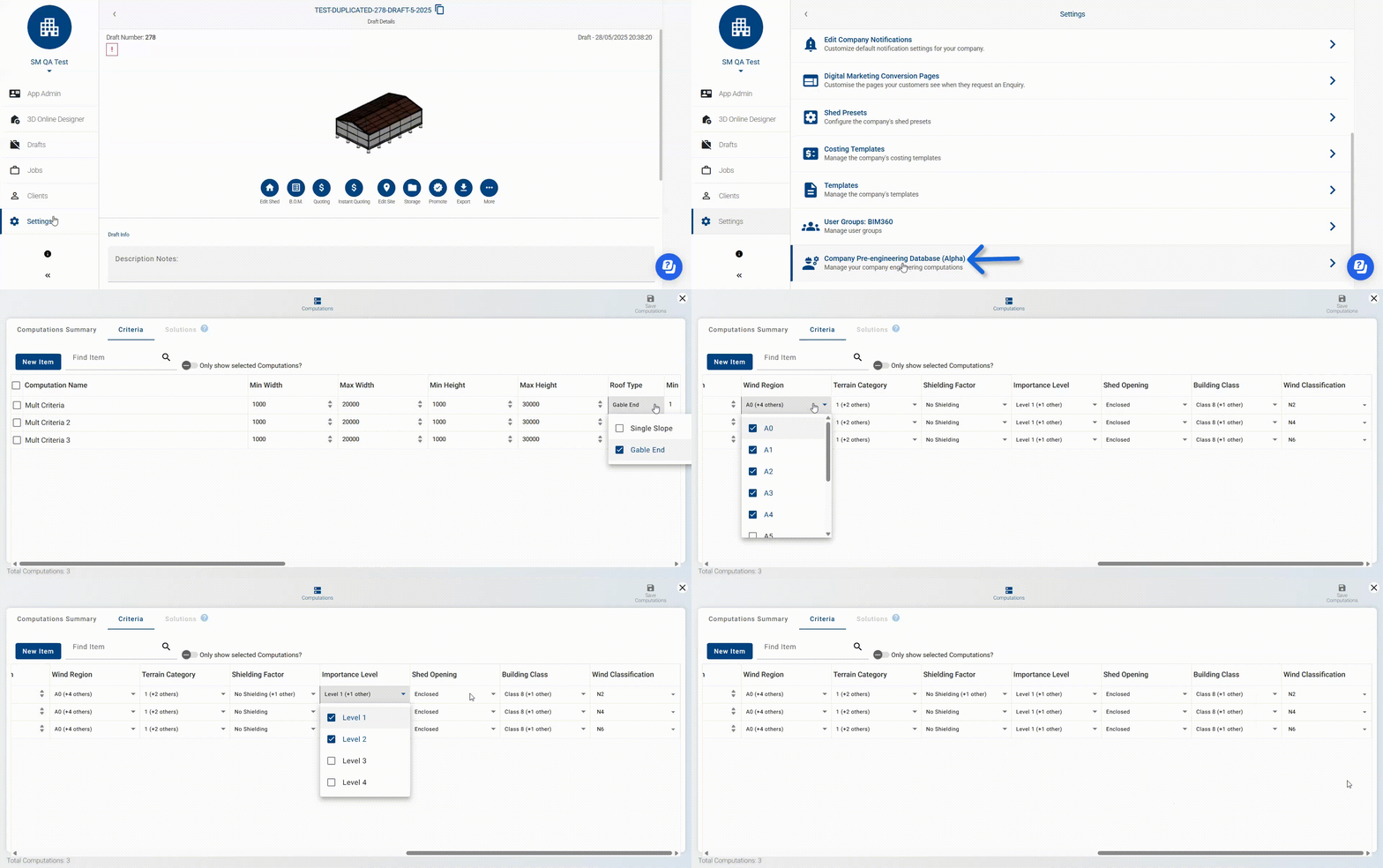
### **Quote faster and reduce manual work**
Handle multiple design scenarios without rebuilding your setup every time.
You can now apply multiple conditions within a single rule, helping you avoid repetitive configurations and respond to quotes much faster.
So you can:
- Evaluate more options in less time
- Reduce repetitive work
- Avoid manual mistakes
- Send quotes faster to your clients
This means less time configuring and more time closing deals.
#### Why this matters
- Reduce duplication
- Simplify your workflow
- Make updates faster and easier
🎥 **See how to use this new feature below.**
****
**Note:** This feature is part of the **Structural Steel** plan. If it’s not currently available in your account and you’d like to use it, just get in touch with our support team we’ll be happy to help.
---
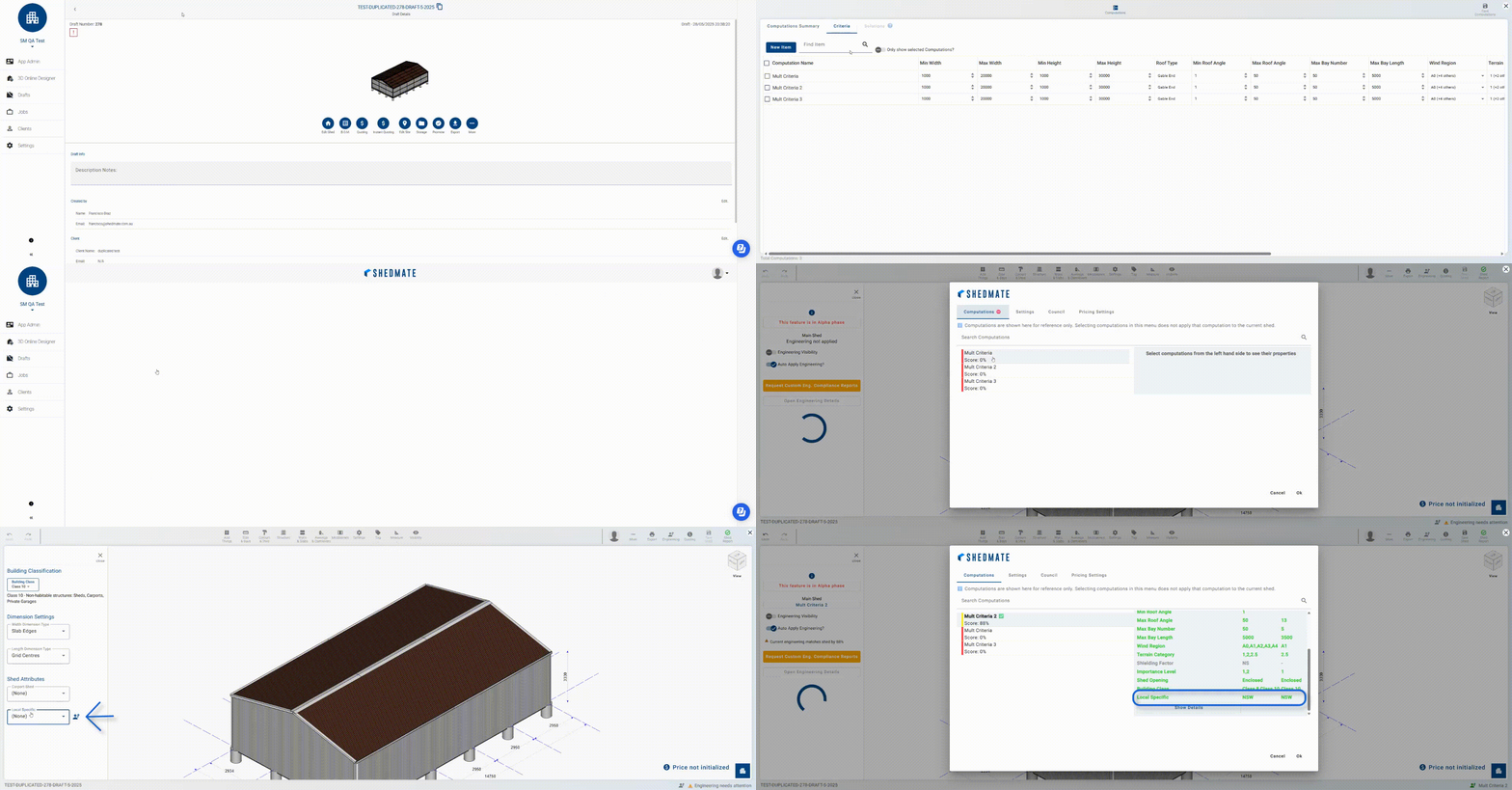
### **Apply the right engineering rules with more precision**
Avoid generic setups and make sure each project uses the correct engineering logic based on its real requirements.
You can now define company-specific conditions that control when each rule should apply, helping you match different project scenarios more accurately.
So you can:
- Apply the right rules for each type of project
- Align your setup with how your company actually operates
- Reduce errors caused by incorrect rule selection
To start using this, these conditions need to be set up specifically for your company.
If this functionality is not yet available in your account, simply contact our support team to enable it.
#### Why this matters
- More accurate engineering decisions
- Better consistency across projects
- Fewer manual corrections
- Greater confidence in every quote
🎥 **See how to use this new feature below.**
**Note:** This feature is part of the **Structural Steel** plan. If it’s not currently available in your account and you’d like to use it, just get in touch with our support team we’ll be happy to help.
---
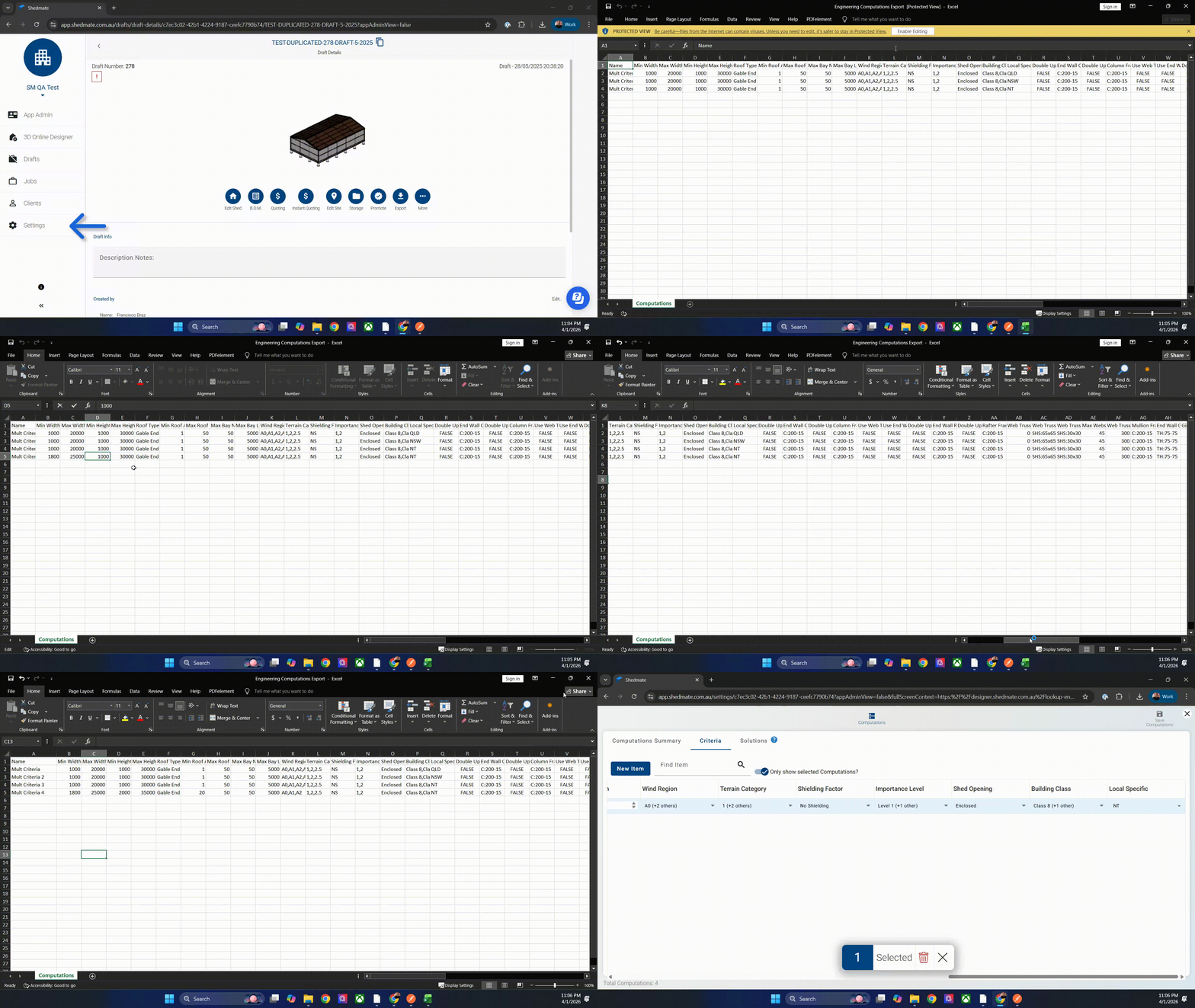
### **Update your engineering setup in minutes, not hours**
Make bulk changes faster and avoid manual rework when managing your engineering rules.
You can now edit and update multiple configurations at once using Excel, making it easier to handle large setups without going one by one.
So you can:
- Update multiple rules in a single step
- Make changes faster across your entire setup
- Reduce manual input and repetitive work
- Keep your configurations consistent
Simply export your current setup, make your updates in Excel, and import it back into Shedmate.
### Why this matters
- Save time on large updates
- Reduce manual errors
- Improve consistency across configurations
- Scale your setup more efficiently
🎥 **See how to use this new feature below.**
****
**Note:** This feature is part of the **Structural Steel** plan. If it’s not currently available in your account and you’d like to use it, just get in touch with our support team we’ll be happy to help.
---
### ⚙️ Smarter Engineering, Better Experience
This release delivers improvements across both **engineering workflows** and **usability**.
With enhanced flexibility, smarter automation, and improved organization, Shedmate continues to evolve to support your day-to-day work more efficiently.
---
**Let’s Build the Future of Sheds—Together!** 🛠️💥
*Your Shedmate Team*
---
**P.S.** Got feedback? We’re all ears! Chat with our support team (support@shedmate.com.au). 💌
- [Introduction to Shedmate (How does it work)](https://help.shedmate.com.au/knowledge/introduction-to-shedmate-how-does-it-work?hsLang=en#main-content)
- [Introduction and useful information](https://help.shedmate.com.au/knowledge/introduction-to-shedmate-how-does-it-work?hsLang=en#introduction-and-useful-information)
- [Workflow for Cold Formed x Structural Steel](https://help.shedmate.com.au/knowledge/introduction-to-shedmate-how-does-it-work?hsLang=en#workflow-for-cold-formed-x-structural-steel)
- [Frequent Asked Questions (FAQ)](https://help.shedmate.com.au/knowledge/frequent-asked-questions-faq?hsLang=en)
- [Release Notes](https://help.shedmate.com.au/knowledge/release-notes?hsLang=en#main-content)
- [2025](https://help.shedmate.com.au/knowledge/release-notes?hsLang=en#2025)
- [2024](https://help.shedmate.com.au/knowledge/release-notes?hsLang=en#2024)
- [2026](https://help.shedmate.com.au/knowledge/release-notes?hsLang=en#2026)
- [Setting up Shedmate](https://help.shedmate.com.au/knowledge/setting-up-shedmate?hsLang=en#main-content)
- [Getting Started](https://help.shedmate.com.au/knowledge/setting-up-shedmate?hsLang=en#getting-started)
- [Setting up Shedmate Costing (COURSE)](https://help.shedmate.com.au/knowledge/setting-up-shedmate-costing-course?hsLang=en#main-content)
- [Introduction to Cost Engineering & Shedmate](https://help.shedmate.com.au/knowledge/setting-up-shedmate-costing-course?hsLang=en#introduction-to-cost-engineering-shedmate)
- [Starting from Scratch - A necessary learning practice](https://help.shedmate.com.au/knowledge/setting-up-shedmate-costing-course?hsLang=en#starting-from-scratch-a-necessary-learning-practice)
- [Fast-Tracking Your Pricing Setup with Pre-Built Templates](https://help.shedmate.com.au/knowledge/setting-up-shedmate-costing-course?hsLang=en#fast-tracking-your-pricing-setup-with-pre-built-templates)
- [Integrations and API](https://help.shedmate.com.au/knowledge/integrations-and-api?hsLang=en)
- [Setting up Pricing in Shedmate (course)](https://help.shedmate.com.au/knowledge/introduction-to-shedmate-costing-course)
- [Frequent Asked Questions](https://help.shedmate.com.au/knowledge/frequent-asked-questions)
- [Setting up Shedmate](https://help.shedmate.com.au/knowledge/setting-up-your-enquiry-system-for-marketing-usage-qr-codes)
- [Integrations](https://help.shedmate.com.au/knowledge/trimble-tekla-structures-integration)
[](http://www.shedmate.com.au)
1 James St, Mount Gambier 5290
South Australia
[mailto:support@shedmate.com.au](mailto:support@shedmate.com.au)
Copyright © 2025, Shedmate